How to Use ModelTrackr Analytics to Find Trending Chaturbate Models
In the fast-paced world of Chaturbate and live cam shows, finding the next trending model can feel like searching for a needle in a haystack. With thousands of cam girls going live every hour, how do you spot the ones gaining momentum before everyone else discovers them? The answer lies in smart analytics.
ModelTrackr turns raw Chaturbate data into actionable insights through its comprehensive Analytics Dashboard. Whether you're a casual viewer looking for fresh faces or a dedicated fan wanting to follow rising stars, this guide will show you exactly how to leverage ModelTrackr's tools to uncover trending models on Chaturbate.
From interpreting watch time statistics to spotting velocity in viewer growth, you'll learn practical strategies that go beyond simply browsing the Discover page. Let's dive in and transform the way you find your next favorite cam performers.
Why Analytics Matter for Discovering Trending Cam Models
The Chaturbate platform is dynamic. Models experience spikes in popularity due to consistent streaming, engaging content, viral moments, or effective use of popular tags like "lovense", "squirt", or "new". Traditional methods — refreshing the homepage or following a handful of bookmarks — often miss these emerging trends.
ModelTrackr's analytics solve this by aggregating real-time and historical data from your personal viewing habits and platform-wide patterns. The Analytics Dashboard provides two main views: Platform Stats and Your Activity. While Your Activity helps you understand your own habits, the Platform Stats section is gold for trend spotting.
Key metrics available include:
- Total models online at any given time
- Viewer distribution across genders and regions
- Trending tags and categories
- Peak viewing hours
- Rising viewer counts for specific models
By combining these with your personalized tracking, you gain a competitive edge in discovering underrated or rapidly growing Chaturbate models.
Many viewers waste time scrolling through hundreds of thumbnails. With ModelTrackr, you can focus on data-driven decisions. For instance, models showing a 30%+ increase in average viewers over a short period often indicate a trending performer gaining traction.
Check out trending models right now to see live examples of what the analytics surface.
Getting Started with ModelTrackr Analytics
Before diving deep, make sure you're set up for success. Head over to ModelTrackr and create a free account. The free plan gives you access to basic analytics, while Pro and Premium plans unlock deeper insights like AI predictions and advanced filtering.
Once logged in:
- Navigate to your Dashboard
- Click on the Analytics tab (or visit directly)
- Explore the two main sections: Platform Stats and Your Activity
The interface is clean and intuitive, with interactive charts, heatmaps, and sortable tables. Data updates in real-time, pulled directly from Chaturbate's public API, ensuring you always have fresh information.
If you're new to the platform, start by adding a few favorite models using the search feature (Ctrl+K). This personalizes your analytics faster. As you watch shows using the built-in Watch Timer, your personal data populates automatically, creating a rich dataset for comparison.
Pro tip: Enable browser notifications so you get alerted when tracked models go live — this keeps your analytics focused on active performers.
Understanding Key Metrics in the Analytics Dashboard
ModelTrackr's analytics aren't just pretty charts — they're powerful tools for trend detection. Here's what to look for:
Viewer Growth and Momentum
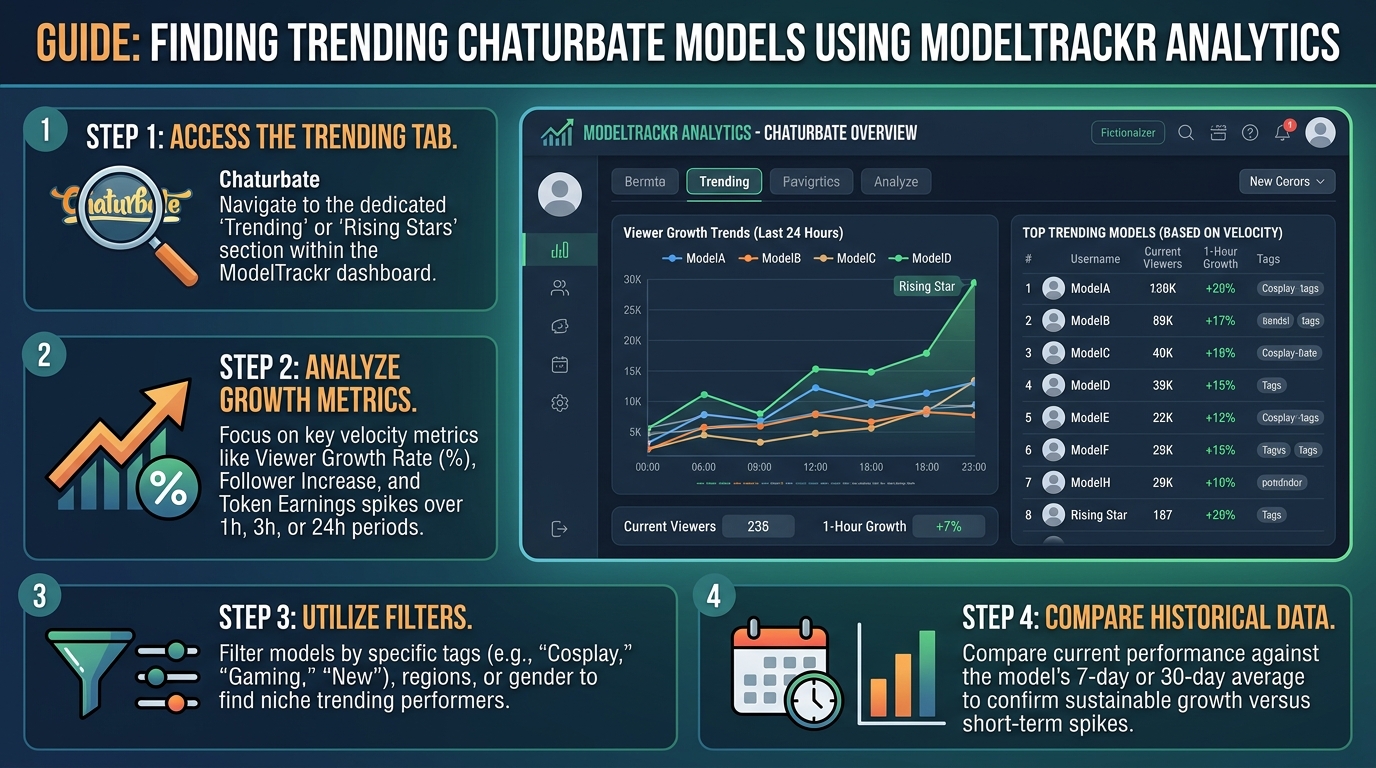
The "Trending Models" view highlights performers with rapidly increasing viewer counts. Look for models whose viewer numbers are climbing steadily rather than spiking once and dropping. Consistent upward trends often signal quality content that keeps audiences engaged.
In the Platform Stats tab, pay attention to:
- Peak viewer count over the last 24 hours
- Average viewers per stream
- Session duration (longer streams tend to attract loyal fans)
A model averaging 200 viewers but jumping to 450+ in recent sessions is a strong trending candidate.
Streaming Patterns and Consistency
The integrated Calendar feature shows historical streaming schedules. Models who stream at predictable times with high consistency tend to build stronger audiences. Use the Calendar alongside analytics to identify performers who are increasing their broadcast frequency — a common sign of someone trying to grow their following.
Tag Performance
Trending models often optimize their tags effectively. The Tag Explorer (available on Standard plans) shows which tags are driving the most traffic. Cross-reference this with models you're tracking to see if they're using high-performing tags like "teen", "latina", "bigboobs", or niche ones gaining popularity.
Your Personal Watch Data
Your Activity tab reveals which types of models you engage with most. The heatmap shows your peak hours, while "Most Watched Models" ranks by precise time spent. Use this to find similar performers through the For You recommendations.
The system analyzes patterns in your viewing to suggest models with comparable tags, performance style, or schedule. This is especially useful for finding hidden gems in categories you already enjoy.
Step-by-Step: Finding Trending Models with Analytics
Here's a practical workflow you can use today:
Step 1: Review Platform-Wide Trends
Open the Analytics Dashboard and examine the "Trending" section. Sort models by recent growth in viewers or total watch time. Note any performers appearing in the top ranks who weren't there a week ago.
Step 2: Cross-Reference with Hidden Gems
Many trending models start as under-the-radar performers. Use the Hidden Gems feature, which leverages algorithms to find high-quality models with lower visibility. Combine this with analytics data to validate their upward trajectory.
Step 3: Track and Monitor
Add promising models to your Tracked list (up to 25 on Pro). The dashboard will then show real-time online status, viewer counts, and thumbnails. Set up Smart Alerts for specific conditions like "Long Stream" or time-window notifications.
Step 4: Analyze Historical Data
Use the 30-day charts to see if a model's growth is sustained. A one-day spike might be a fluke, but multi-day increases indicate real momentum.
Step 5: Compare Models
The Model Comparison tool lets you pit similar performers against each other. Compare viewer trends, tags, and streaming hours side-by-side to decide which ones are truly trending.
Many users create custom Collections like "Rising Stars" or "Weekend Trends" to organize their discoveries.
Advanced Techniques for Power Users
Premium subscribers get access to AI Schedule Predictions, which forecast when tracked models are likely to go live next. This is incredibly useful for planning your viewing around trending performers who might stream during your available hours.
The Multi-Cam Viewer allows monitoring several rising models simultaneously. Watch their viewer counts in real-time to see who gains traction fastest during overlapping streams.
Use the Watch Timer on potential trending models. The precise data collected helps the analytics engine understand engagement better, refining future recommendations.
For those concerned about screen time, the Watch Limit feature helps maintain balance while exploring new cam girls.
Don't forget the Floating Mini Player — it lets you keep a promising model's stream open in the corner while you browse analytics or discover more models.
Real-World Examples of Trending Model Discovery
Consider a model who suddenly jumps from 80 average viewers to 350 over two weeks. Analytics might reveal she's streaming more consistently, added popular tags, and receives strong engagement during evening hours.
By tracking her early, you get to enjoy her content as her audience grows, often before she appears on the main Chaturbate trending lists. Many dedicated viewers build impressive lists of "their" models this way, following careers from new to established stars.
Platform-wide stats also reveal broader trends, such as increasing popularity of certain regions or categories, helping you anticipate what types of cam performers will trend next.
Integrating Analytics with Other ModelTrackr Features
Analytics don't exist in isolation. Combine them with:
- Favorites system for quick access to your core group
- Notifications to get instant alerts on trending models you track
- Global Search to quickly pull up any performer and view their stats
- Surprise Me button for serendipitous discoveries that you can then validate with analytics
The Cum Counter, while fun and private, also contributes to your personal "Most Cummed" rankings, adding another layer of personalization to your dashboard.
For those who record shows, the My Recordings library (Pro plan) lets you revisit past performances from trending models to better understand what drove their popularity.
Common Mistakes to Avoid
- Focusing only on top viewer counts: Sometimes the real trends are in the mid-tier models showing strong growth.
- Ignoring schedule consistency: A model with high peaks but infrequent streams may not be sustainable.
- Not using personalized data: Your own watch history makes recommendations far more relevant than generic trending lists.
- Overlooking tag data: Tags are a major driver of discoverability on Chaturbate.
Regularly review your analytics — weekly check-ins help you stay ahead of trends rather than chasing them.
Taking Your Discovery to the Next Level
ModelTrackr transforms passive browsing into strategic exploration. Instead of hoping to stumble upon great cam girls, you actively identify those with the highest potential using data.
Whether you enjoy solo female performers, couples, trans models, or specific niches, the analytics adapt to your preferences while exposing you to new talent.
The best part? It all starts free. Begin with basic tracking and analytics, then upgrade as your list of followed models grows and you want more advanced features like AI predictions or unlimited tracking.
Ready to start finding your next favorite Chaturbate models? Sign up for ModelTrackr today and open the Analytics Dashboard. Your personalized trend radar awaits.
Explore the full range of discovery tools on the Discover page and see why ModelTrackr has become the go-to platform for serious fans of live cam entertainment.
By combining real-time data, historical patterns, and intelligent recommendations, you'll never miss the excitement of watching a talented performer rise to popularity. Happy streaming and happy discovering!
ModelTrackr — Never miss a live show.