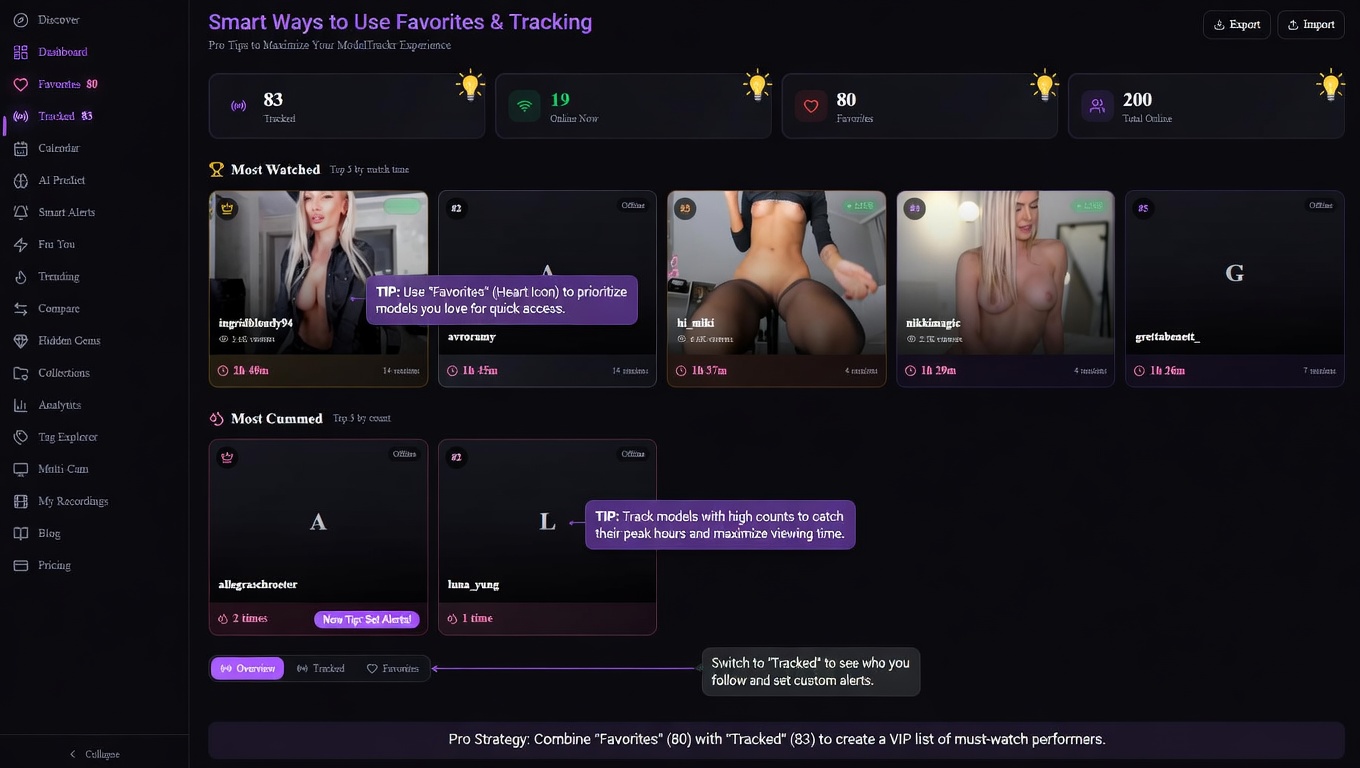
Smart Ways to Use Favorites and Tracking on ModelTrackr for Chaturbate Fans
If you've ever refreshed the Chaturbate homepage endlessly hoping to catch your favorite cam model online, you're not alone. The world of live adult cams is exciting but chaotic — with thousands of performers streaming at any given moment, it's easy to miss the shows you love most. That's where ModelTrackr comes in as your personal Chaturbate companion.
ModelTrackr is the ultimate platform for discovering, organizing, and tracking your favorite Chaturbate models. Whether you're into solo female performers, couples, trans models, or something more specific, the app makes it simple to build your own curated list and get notified the second someone goes live. In this guide, we'll explore smart, practical ways to use the favorites and tracking features to level up your viewing experience.
From casual browsing to building a serious watch list, these tips will help you save time, reduce frustration, and enjoy more of the content you actually care about. Let's dive in!
Why Favorites and Tracking Matter for Chaturbate Viewers
Chaturbate is an incredible platform filled with talented cam girls and models from around the world. But with so many options, it's tough to keep track without some help. Manually checking profiles or hoping they appear in search results is inefficient and often leads to disappointment.
Favorites act like a quick-access bookmark system — a simple heart click saves a model for easy return visits. Tracking takes it further by actively monitoring those models and sending you alerts when they start streaming. Together, they create a personalized Chaturbate dashboard that puts your interests front and center.
The best part? ModelTrackr is free to start, with generous limits even on the basic plan. You can begin building your list right away and upgrade later for more slots and advanced features like browser push notifications.
Ready to get organized? Head over to the Discover page and start exploring thousands of live cam models in real-time.
Getting Started: How to Favorite and Track Models on ModelTrackr
Using the platform is refreshingly straightforward. Here's the quick-start process:
- Visit ModelTrackr and sign up (or browse as a guest to test it out).
- Browse the live model grid on the Discover page using filters for gender, tags, viewer count, or region.
- When you spot a performer you like, click the heart icon on their card to add them to your favorites.
- For deeper monitoring, choose the Track option instead (or in addition). Tracked models get priority in your dashboard and notifications.
Favorites are perfect for building a broader collection — think of them as your "I like these" list. Tracking is for your absolute must-see cam girls — the ones whose streams you never want to miss.
Pro tip: Use the global search (Ctrl+K) to quickly find specific model usernames without scrolling through hundreds of thumbnails. It's a huge time-saver when you're looking for that one performer whose name you can never quite remember.
Smart Strategy #1: Build Tiered Lists for Better Organization
Don't treat all your favorite Chaturbate models the same. Smart users create natural tiers:
- Tier 1 (Must-See): Track these 2-5 models. You'll get real-time notifications and see them prominently in your dashboard whenever they're online.
- Tier 2 (Love to Watch): Add these to favorites. Easy access without overwhelming your notification feed.
- Tier 3 (Discovery): Keep an eye on new or occasional performers you find through the surprise me button or tag explorer.
This tiered approach prevents notification fatigue while ensuring your top favorites are always top of mind. On the free plan, you get 5 favorites and 2 tracked models — more than enough to start building meaningful tiers. Paid plans increase these limits significantly, with Premium offering unlimited everything.
Many viewers combine this with the Calendar feature to spot streaming patterns. Does your favorite cam girl usually go live on weekday evenings? The calendar shows historical data so you can plan your schedule accordingly.
Smart Strategy #2: Use Notifications to Never Miss a Live Show
The real magic happens when those tracked models go online. ModelTrackr's notification system is designed to keep you in the loop without being annoying:
- In-app alerts pop up with the model's thumbnail and current viewer count.
- Browser push notifications (available on Standard and higher plans) work even when the tab is closed.
- The notification bell in the header shows unread counts at a glance.
Here's a clever way to use it: Set up your tracked list before your typical viewing hours. If you usually log in after work, add your top cam girls to tracking in the morning. When they start streaming, you'll get an alert no matter what you're doing.
For power users, the AI Smart Alerts on Premium plans let you create rules like "only notify me between 8 PM and midnight" or "alert when they've been streaming for over an hour." This level of customization makes tracking feel truly personal.
Smart Strategy #3: Combine with Other ModelTrackr Features
Favorites and tracking become even more powerful when paired with the rest of the app:
The Dashboard serves as your command center. See who's online right now among your tracked and favorited models, complete with live thumbnails and viewer counts. It's like having a custom Chaturbate homepage tailored exactly to you.
Love discovering new talent? Use the For You recommendations page, which suggests models based on who you've already favorited. It's AI-powered and surprisingly accurate at finding similar performers.
If you're the type who watches multiple streams, check out the Multi-Cam Viewer. Add several of your tracked models and watch them side-by-side in a split-screen layout.
And for those moments when you want to keep the stream going while browsing, the floating mini player is a game-changer. Open a model page, click the mini player button, and continue exploring the Discover page while their show plays in a draggable corner window.
Smart Strategy #4: Leverage the Watch Timer and Analytics
One of the coolest hidden benefits of using tracking is the data it generates over time. Every time you open a tracked model's stream, the built-in Watch Timer automatically records how long you spend watching.
This data feeds into the Analytics Dashboard, where you can see insights like:
- Your most-watched models
- Total active watching hours
- Daily averages and streaks
- Activity heatmaps showing your peak viewing times
Understanding your own habits can help you refine your favorites list. Maybe you thought you loved a certain cam girl's shows, but the numbers show you only watch for a few minutes. Or perhaps you'll discover you have a favorite late-night performer you didn't realize you tuned into so often.
This level of personal insight turns casual viewing into a more intentional hobby.
Smart Strategy #5: Manage Your Time with Watch Limits
Let's be honest — it's easy to lose track of time when you're enjoying great cam shows. ModelTrackr includes a thoughtful Watch Limit tool to help you stay in control.
On any model page, tap the alarm icon next to the watch timer. You can set it to "Stop at" a specific time (like 11 PM) or "Max Time" for a certain duration (30 minutes, 1 hour, etc.). When the limit hits, a friendly popup reminds you — with options to snooze for 5 or 15 minutes if you need a little more time.
This feature is especially useful when you're tracking several models. You can enjoy your favorites responsibly without feeling like the night got away from you.
Advanced Tips for Power Users
Once you're comfortable with the basics, try these pro techniques:
-
Seasonal Refresh: Every month or two, review your favorites list. Remove models whose content no longer clicks with you and add fresh discoveries from the Trending Models page.
-
Themed Collections: Upgrade to Pro to create custom collections. Group models by vibe — "Evening Relaxation," "High-Energy Shows," or "Weekend Favorites." It's perfect for quickly switching mindsets.
-
Model Notes: Jot down private notes about specific performers. Maybe one has a signature show every Friday, or another loves a particular type of tip. These notes stay with the model profile and are searchable.
-
Hidden Gems Hunt: Use the Hidden Gems feature to find underrated cam girls who aren't getting the attention they deserve. Add the best ones to your favorites for future tracking.
-
Comparison Tool: Can't decide between two similar models? Use the model comparison feature to see their streaming patterns, average viewers, and tags side by side.
Don't forget about the Cum Counter on individual model pages. It's a fun, private way to track your personal milestones with specific performers — completely invisible to anyone else.
Common Mistakes to Avoid
Even with great tools, some habits can reduce effectiveness:
- Adding too many models to tracking right away. Start small so notifications stay meaningful.
- Ignoring the difference between favorites and tracked. Use tracking sparingly for your true regulars.
- Forgetting to check the dashboard regularly. It's where all your hard work organizing pays off.
- Not logging in. While guest mode works, signing in syncs your data across devices and unlocks cloud features.
Real User Stories: How Favorites Changed Everything
Many viewers report that ModelTrackr completely changed how they enjoy Chaturbate. One user mentioned finally being able to consistently catch his favorite performer's evening shows after months of missing them. Another said the tracking feature helped her discover a whole new set of cam girls who matched her schedule perfectly.
The calendar view is frequently praised for revealing unexpected patterns — like realizing a beloved model almost always streams on Tuesdays and Thursdays.
These small wins add up to a much more satisfying viewing experience overall.
Taking It to the Next Level with Paid Plans
While the free tier is excellent for beginners, upgrading unlocks features that make favorites and tracking even smarter:
- Standard plan gives you more favorites, tracking slots, and browser notifications.
- Pro adds custom collections, model notes, comparison tools, and the My Recordings library.
- Premium brings AI schedule predictions, advanced smart alerts with auto-open streams, and the full analytics dashboard.
Check out all the details on the pricing page to see which plan fits your viewing habits best.
Conclusion: Make ModelTrackr Your Chaturbate Secret Weapon
Using favorites and tracking features on ModelTrackr isn't just about convenience — it's about transforming how you experience live cam entertainment. Instead of endless scrolling and missed opportunities, you get a personalized, efficient system that puts your favorite Chaturbate cam girls front and center.
Start simple: visit the discover page today, add a few models that catch your eye, and see how it feels. Before long, you'll wonder how you ever managed without it.
Ready to never miss another live show? Sign up for ModelTrackr and begin building your perfect list today. Your future self (and your favorite performers) will thank you.
What are you waiting for? The next amazing stream from one of your top cam girls could be happening right now.
ModelTrackr — Never miss a live show.